
Interconnecting professional balanced gear (XLR / 6.35mm TRS) with consumer unbalanced devices (RCA / 6.35mm TS) is a frequent necessity in home studios, DJ setups, and venue PA systems. However, using simple passive cable adapters (like a cheap XLR-to-RCA cable) often results in a -6dB signal level drop, severe impedance mismatch, and loud 60Hz ground loop hum.
Connecting different connector formats safely requires proper impedance balancing and ground isolation to protect your tone and equipment.
The Hidden Risks of Direct Cable Adapters
1. Pin Shorting & Ground Loop Hum
In a balanced XLR or 6.35mm TRS line, audio travels across two signal conductors (Hot + and Cold -) plus a ground shield. Standard adapter cables force the Cold pin (-) directly into the ground shield of the RCA/TS plug. This short circuit creates a massive ground loop antenna that picks up AC humming, Wi-Fi interference, and motherboard buzz.
2. Signal Level & Gain Mismatch
- Professional Line Level (+4dBu): XLR and balanced 6.35mm TRS outputs drive hot, high-voltage signals meant for professional consoles and active monitors.
- Consumer Line Level (-10dBV): RCA and 3.5mm inputs are designed for lower signal voltages.
Feeding an unattenuated +4dBu XLR output straight into an RCA input overloads consumer preamps, leading to harsh harmonic clipping distortion.
3 Rules for Clean Audio Format Conversion
- Use 1:1 Transformer Galvanic Isolation: A transformer converts balanced signals to unbalanced magnetically without physically tying the signal pins to the ground shield.
- Match Headroom with a PAD Switch: When routing hot XLR outputs into delicate RCA recording or streaming devices, engage a -15dB PAD switch to lower signal levels into a clean operating range.
- Maintain Ground Independence: Choose isolation hardware equipped with a GND LIFT switch so you can break ground circuits when connecting devices powered by different AC outlets.
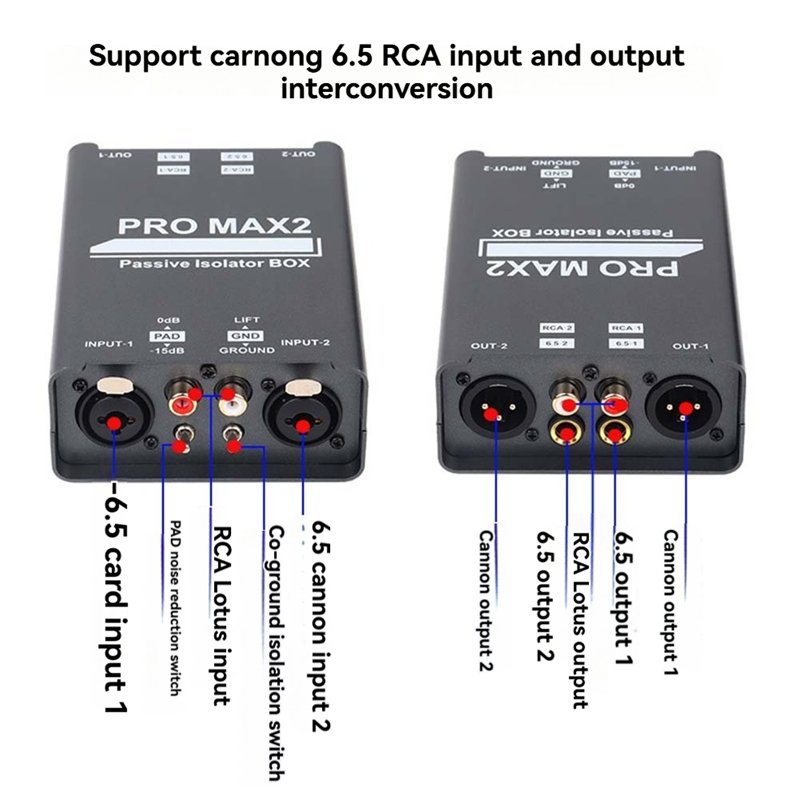
Direct Cable Adapter vs. PRO MAX2 Matrix Isolator Box
| Conversion Metric | Direct Cable Adapter (XLR to RCA) | PRO MAX2 Matrix Isolation BOX |
| Ground Loop Protection | None (Ties ground pins together) | 100% Galvanic Separation (1:1 Transformers) |
| Signal Level Loss | Uncontrolled -6dB volume drop | Zero Loss / Flat 20Hz–20kHz Response |
| Input/Output Versatility | Fixed format (Single cable type) | Full Matrix (XLR / 6.35mm TRS-TS / RCA) |
| Signal Attenuation | None (Risk of input clipping) | Dual Mode: 0dB / -15dB PAD Switch |
| Shielding Performance | Thin cable jacket | Heavy-Duty Aluminum Faraday Shielding |
Universal Format Conversion: PRO MAX2 Isolator
The PRO MAX2 Passive Isolator BOX functions as a complete audio matrix converter. With dual XLR, 6.35mm (TRS/TS), and RCA inputs and outputs on both sides, it lets you convert XLR $\rightarrow$ RCA, RCA $\rightarrow$ 6.35mm, or 6.35mm $\rightarrow$ XLR cleanly without tone loss, signal attenuation, or electrical hum.
Frequently Asked Questions:
Does connecting XLR to RCA reduce my audio volume?
Answer 1:
Yes. Standard passive cable adapters drop balanced signal levels by approximately 6dB because half of the differential signal is grounded. Using a 1:1 transformer isolation box like the PRO MAX2 converts balanced to unbalanced signals magnetically without dropping line voltage or ruining signal dynamics.
Can I run an RCA to XLR cable over a long distance without noise?
Answer 2:
RCA cables are unbalanced and pick up noise over distances greater than 10–15 feet. To run long cable lines, plug your short RCA cable into a passive matrix isolator box near the source, then run balanced XLR cables out to your mixer or stage box.
Why does my audio distort when converting 6.35mm/XLR outputs to RCA inputs?
Answer 3:
Professional XLR and 6.35mm outputs operate at a higher signal voltage (+4dBu) than consumer RCA inputs (-10dBV). Engaging the -15dB PAD switch on the PRO MAX2 attenuates hot line levels down to an ideal range, preventing input distortion.