Plugging your DJ controller or mixer into a venue’s main PA system should be simple, but live performance environments are notorious for introducing unexpected audio issues. Loud 60Hz hums, digital USB whine from laptops, and distorted sound caused by overdriven venue inputs can quickly ruin a set.
To deliver clean, dynamic sound at any venue, you must manage power differences, impedance matching, and ground isolation between your DJ booth and the house sound system.
3 Common DJ Connection Pitfalls That Cause Noise
1. Separate Power Circuits (Ground Loop Hum)
Your DJ booth (laptop, controller, media players) is often plugged into an outlet on stage or behind the booth, while the venue’s main PA system and FOH (Front of House) mixer run on completely different power breakers. This electrical potential difference creates a ground loop, generating a loud 60Hz or 50Hz hum through the speakers.
2. Long Unbalanced RCA Cable Runs
Many DJ controllers only offer unbalanced RCA or 6.35mm TS outputs. Running unbalanced RCA cables across long distances (over 10–15 feet) to a stage box or venue mixer turns the cable into an antenna that picks up stage lighting hum, wireless mic interference, and power line noise.
3. Hot Signals Overloading Venue Inputs
DJ mixers often output high-voltage (+4dBu or higher) line signals. Feeding a hot signal directly into a sensitive venue mixer channel or stage box without attenuation causes severe preamp clipping distortion—even if your controller meters aren’t redlining.
Step-by-Step: Clean Signal Routing for DJ Rigs
- Keep Booth Power Consolidated: Plug your DJ controller, laptop power brick, and booth monitors into a single quality power strip.
- Convert to Balanced Signals Near the Booth: Never run long RCA lines across the floor. Convert unbalanced RCA or 6.35mm outputs to balanced XLR as close to your controller as possible.
- Insert Galvanic Transformer Isolation: Place a 1:1 passive isolator between your DJ mixer outputs and the house PA inputs. Internal transformers magnetically transfer audio while severing the direct copper ground connection.
- Engage Attenuation for Hot Mixers: If the FOH engineer reports input distortion, activate a -15dB PAD switch on your isolation hardware to drop the output level to a clean operating range.
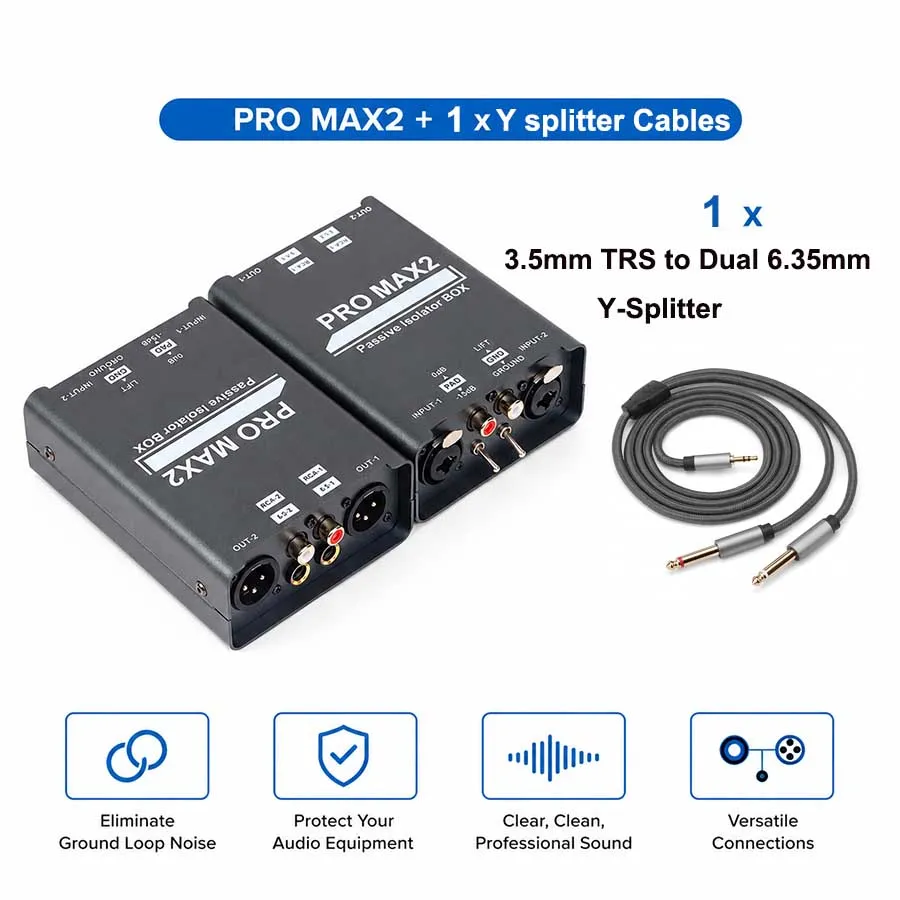
DJ Connection Setup: Direct Cables vs. PRO MAX2 Isolation Matrix
| Connection Challenge | Direct Cable / Standard Adapter | PRO MAX2 Passive Isolator BOX |
| Ground Loop Protection | None (Triggers loud 60Hz venue hum) | 100% Galvanic Separation (1:1 Coils) |
| Signal Overload Handling | Prone to input clipping distortion | Switchable 0dB / -15dB PAD Control |
| Interface Flexibility | Restricted to a single cable type | Full Matrix (XLR / 6.35mm TRS-TS / RCA) |
| Stage Shielding | Thin cable jackets pick up EMI | Heavy-Duty Anodized Aluminum Chassis |
| Power Requirement | N/A | 100% Passive (Plug-and-Play) |
The Essential DJ Gig Saver: PRO MAX2 Isolator Box
The PRO MAX2 Passive Isolator BOX gives mobile DJs and club performers total control over their signal chain. Featuring dual XLR, 6.35mm, and RCA inputs and outputs on both sides, it acts as a universal problem solver:
- Convert RCA controller outputs $\rightarrow$ Balanced XLR venue snakes.
- Eliminate 60Hz electrical hum with the dedicated GND LIFT switch.
- Prevent preamp distortion using the built-in -15dB PAD switch.
Frequently Asked Questions:
Why do I get a loud hum when plugging my DJ controller into a venue PA system?
Answer 1:
Venue hum is usually caused by ground loops between the DJ booth power outlet and the main PA system’s power circuit. Inserting a passive 1:1 audio isolator (like the PRO MAX2) between your controller and the venue box breaks the electrical ground loop instantly.
Should I use RCA or XLR outputs from my DJ mixer to the PA system?
Answer 2:
Always use balanced XLR outputs for long runs to a PA system to prevent noise interference. If your DJ controller only has RCA outputs, plug short RCA cables into a matrix isolation box near your setup, then run balanced XLR cables out to the venue system.
What should I do if the house sound distorts even when my DJ mixer isn’t redlining?
Answer 3:
High output voltages from DJ controllers can overload the input preamps of venue mixers. Engage a -15dB PAD switch on your audio isolator to lower the signal level into a clean headroom range without sacrificing dynamic range.