
If you have ever heard a high-pitched buzzing, grinding, or low 60Hz hum coming from your studio monitors whenever you move your mouse, boot up a video game, or stress your GPU, you are not alone.
This maddening noise is rarely a sign of a broken audio interface or bad speakers. As an audio engineer with 20 years in live sound and studio setups, I can tell you this is a classic ground loop phenomenon caused by stray current traveling through your USB and 6.35mm audio connections.
Here is the exact technical breakdown of why this happens and how to eliminate it permanently from your desktop setup.
Why Does Your PC Cause Audio Buzzing?
In a standard desktop computer setup, your PC tower, monitor screens, and active studio monitors (speakers) are typically plugged into the same power strip or nearby wall outlets.
- The Stray Ground Path: Your PC’s Power Supply Unit (PSU) and powerful graphics cards (GPUs) generate significant high-frequency electrical noise during operation.
- The USB Bridge: This electrical noise bleeds through the motherboard’s ground plane and travels along the USB cable into your audio interface.
- The Speaker Loop: From the audio interface, the ground path continues through your 6.35mm (1/4″) or RCA cables into your active speakers, which share the same ground via the AC power outlet.
Because the ground potential between your PC PSU and your active speakers is slightly different, a continuous electrical loop is formed. Your studio speakers end up amplifying this electrical ripple as audible noise.
Step-by-Step Troubleshooting Guide
Before buying new hardware, walk through these quick software and cabling isolation steps:
Step 1: Isolate the Power Source
Plug your PC tower and monitor screens into one wall outlet, and plug your active studio speakers into a completely separate AC outlet on a different wall circuit if possible. If the buzzing pitch changes or drops, you have confirmed a ground loop differential.
Step 2: Check Balanced vs. Unbalanced Cables
Ensure you are using 6.35mm TRS (Tip-Ring-Sleeve / Balanced) cables rather than 6.35mm TS (Tip-Sleeve / Unbalanced) instrument cables between your interface and studio monitors. Balanced cables reject external electromagnetic interference (EMI), though they may not completely break a physical power ground loop.
Step 3: Test Under GPU Load
Run a GPU benchmark or open a game. If the high-pitched “computer brain noise” gets louder as your frame rate increases, the noise is 100% bleeding through the shared ground line via USB/Audio ground circuits.
The Permanent Solution: 1:1 Physical Line Isolation
If balanced cables and power strip rearranging do not solve the hum, you need to physically sever the copper ground path between the audio interface outputs and your speakers without interrupting the actual audio signal.
This is achieved using a 1:1 Audio Isolation Transformer.
[ PC / Laptop ]
       │ (USB Cable)
       ▼
[ Audio Interface ]
       │ (6.35mm Out)
       ▼
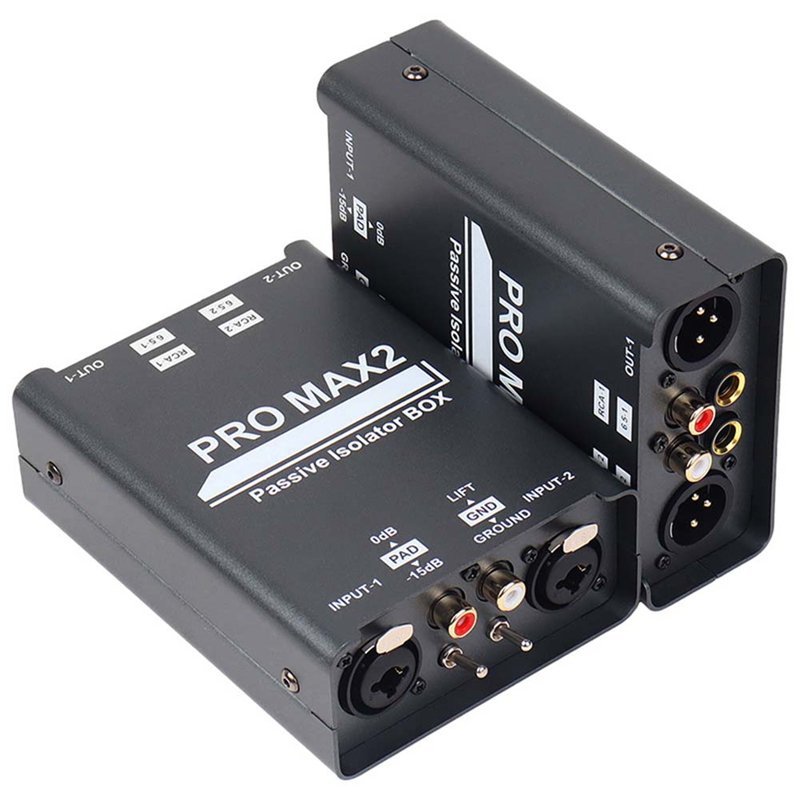
[ PRO MAX2 Ground Isolator Box ] ──► (Physical Transformer Break / Ground Lift)
       │ (6.35mm / XLR Out)
       ▼
[ Studio Monitors ]  ====> Pure, Silent Audio!
Why a Passive Ground Isolator Works Best:
- True Galvanic Isolation: Premium audio transformers transfer the sound signal electromagnetically via magnetic flux rather than physical copper wire contact. This breaks the electric circuit completely.
- Ground Lift Switch: A dedicated ground lift allows you to disconnect the shield drain wire instantly if a secondary ground reference is present.
- No Distortion or Quality Loss: High-grade transformers maintain a flat frequency response (20Hz to 25kHz), preserving deep bass response and crisp high-end detail.
For desktop studio setups, a multi-format isolator like the FS-ELEC PRO MAX2 handles 6.35mm TRS, XLR, and RCA matrix connections natively. It allows you to run 6.35mm from your interface into the box and output via XLR directly to your studio monitors, eliminating all ground hum and USB buzz instantly.
Quick Checklist for a Quiet Studio Setup
- Use balanced 6.35mm TRS or XLR interconnects wherever supported.
- Avoid plugging high-wattage PC towers and studio speakers into cheap, ungrounded power taps.
- Insert a dual-channel passive ground isolator between your audio interface output and studio monitors to permanently eliminate PC GPU and USB ground loops.
Frequently Ask Question:
A: Mouse movement alters CPU/GPU power states, causing ground potential fluctuations that bleed through the USB ground into your studio speakers.