
If you connect your synthesizer, digital piano, or guitar multi-FX processor (like a Line 6 Helix, Quad Cortex, or Kemper) to your computer via USB for MIDI or software patch editing, and then run 6.35mm audio cables out to your audio interface or live mixer, you have likely heard a maddening high-pitched digital whine or background buzz.
Unplug the USB cable, and the audio instantly becomes crystal clear. But in a modern studio or live rig, you need that USB connection for MIDI clock, automation, and patch management.
As a 20-year audio engineer, I encounter this specific issue constantly in both home studios and touring stage rigs. This high-pitched digital whine is a classic dual-ground loop caused by simultaneous USB and audio ground paths.
Here is the exact technical explanation of why synths and guitar profilers generate ground noise over USB, and how to eliminate it permanently without disconnecting your MIDI control.
The Anatomy of Synthesizer & Pedalboard USB Ground Noise
To understand why this digital noise occurs, you have to look at the ground path created when a hardware instrument is plugged into both a computer and an audio interface.
                  ┌──────────────────────────────┐
                  │          PC / Laptop         │
                  └──────┬────────────────┬──────┘
                         │ (USB Cable)    │ (USB Cable)
                         ▼                ▼
┌────────────────────────────────┐      ┌────────────────────────────────┐
│ Audio Interface / Stage Mixer  │      │ Synthesizer / Guitar Profiler  │
└────────────────┬───────────────┘      └────────────────┬───────────────┘
                 │                                       │
                 └───────────► [ 6.35mm Audio Cable ] ───┘
                               (Ground Loop Circuit)
- The Shared USB Ground Plane: Your PC’s motherboard supplies 5V power and ground lines across all USB ports. High-frequency digital noise from the CPU, GPU, and internal power regulators bleeds into the USB ground plane.
- The Audio Cable Loop: Your hardware synth or guitar profiler receives this digital ground noise via its USB port. The noise travels internally through the instrument’s circuit board and escapes along the shield wire of your 6.35mm (1/4″) audio cables back to your audio interface or mixer.
- The Audible Whine: Because digital clock signals, MIDI data, and GPU power draws fluctuate rapidly, the resulting audio noise manifests as a high-pitched “computer processing” whine, hash, or static that changes when you send MIDI messages or use your PC mouse.
Step-by-Step Diagnostic Check
Before altering your cable setup, run this quick diagnostic sequence:
Step 1: The USB Disconnect Test
Play a note on your synthesizer or guitar processor while connected to your audio interface. Unplug the USB cable connecting the instrument to your computer.
- If the whine stops instantly: You have confirmed a USB/audio ground loop.
Step 2: Test Unbalanced vs. Balanced Outputs
Check your instrument’s user manual to see if its 6.35mm outputs are Balanced (TRS) or Unbalanced (TS).
- Many classic synthesizers and guitar pedals only feature unbalanced TS outputs. Unbalanced cables cannot reject common-mode noise, making them exceptionally vulnerable to USB ground loops.
Why Cheap Solutions Fail on Instruments
Musicians often try fixing this noise with cheap $5 ground loop dongles or USB isolators. However, these quick fixes introduce new problems:
- USB Speed Limits: Cheap USB isolators frequently limit data speeds to USB 1.1, causing MIDI latency, sync dropouts, or failure to communicate with modern editing software (like Neural DSP, Helix Edit, or Roland Cloud).
- Audio Tone Sucking: Cheap 3.5mm line isolators use undersized transformers that saturate easily, stripping away deep synthesizer sub-bass (like 30Hz Moog bass patches) and muddying high-frequency guitar harmonics.
The Professional Fix: Passive Audio Line Isolation
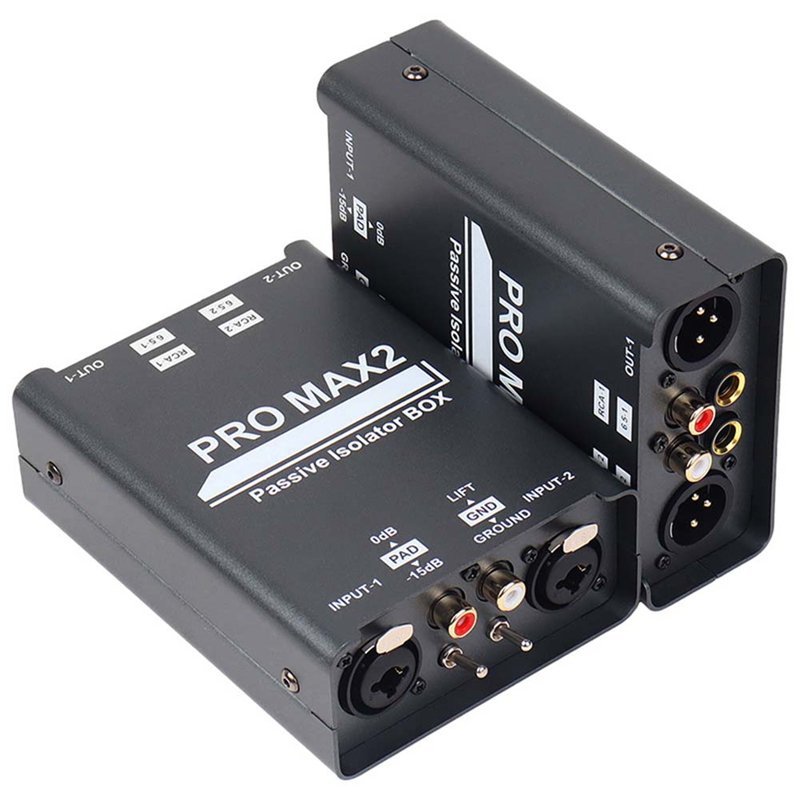
The safest and most reliable way to eliminate USB digital noise while maintaining high-speed MIDI communication is to leave the USB cable plugged into your computer and insert a passive 1:1 line isolator on the audio output lines.
This isolates the ground on the audio side via magnetic transformer coupling, breaking the loop completely.
[ Synth / Guitar Profiler ]
            │ (Unbalanced / Balanced 6.35mm Out)
            ▼
[ FS-ELEC PRO MAX2 Ground Isolator ] ──► (True Galvanic Isolation + Ground Lift)
            │ (6.35mm / XLR Balanced Out)
            ▼
[ Audio Interface / Stage Mixer ] ====> Pure, Pristine, Noise-Free Audio!
Why the FS-ELEC PRO MAX2 is Essential for Synths & Guitar Rigs
Whether you are routing stereo Moog synthesizers or high-end Neural DSP / Line 6 guitar profilers into your interface, the FS-ELEC PRO MAX2 is engineered to handle wide dynamic range instruments without tone alteration:
- True Galvanic Isolation: High-efficiency custom transformers transfer audio electromagnetically, physically severing dirty USB ground lines before they enter your audio interface.
- -15dB PAD Attenuation Switch: Synthesizers and digital guitar profilers produce extremely high output levels (hot line-level signals) that can easily overload audio interface preamps. Engaging the -15dB PAD prevents input stage clipping, preserving pristine dynamic headroom.
- 20Hz – 25kHz Flat Frequency Response (±0.2 dB): Custom-wound nickel-core transformers guarantee that deep 20Hz sub-bass synthesizer patches and crisp 20kHz guitar harmonics remain 100% transparent with zero “tone suck.”
- Pro-Grade Ground Lift Switch: Safely lifts the shield wire reference on audio lines at the flick of a switch, terminating multi-ground loops without compromising AC safety ground.
- Universal Matrix Connections (6.35mm TRS/TS, XLR, RCA): Accepts 6.35mm TS/TRS outputs from your keyboards or pedalboards and outputs via balanced XLR or 6.35mm straight into studio monitors, audio interfaces, or stage snakes.
- Heavy-Duty Shielded Steel Housing (470g): Industrial metal casing shields internal audio transformers from stage lighting dimmers, power strips, and wireless pedalboard receivers.
Summary Checklist for Noise-Free Instruments
- Keep high-speed USB cables plugged in for reliable MIDI and software editing.
- Never remove AC safety ground plugs on synth power bricks or guitar amp power cords.
- Place a dual-channel passive ground isolator like the FS-ELEC PRO MAX2 between your synthesizer/guitar profiler outputs and your interface to permanently eliminate digital USB buzz.
Frequently Ask Question:
A: High-frequency computer ground noise bleeds into the USB ground line, traveling through the synth’s audio output shield back to your audio interface, creating a digital whine.
A: Cheap isolators cause tone suck and loss of low end. Pro-grade isolators like the PRO MAX2 feature 20Hz-25kHz flat transformers that preserve full frequency response without signal loss.