
Bridging consumer audio gear with professional studio equipment is one of the most common triggers for maddening ground loop buzzes and hums in home studios.
Whether you are connecting a desktop DAC, DJ mixer, vinyl turntable preamp, or TV/AV receiver featuring unbalanced RCA outputs directly into active studio monitors or audio interfaces expecting balanced XLR inputs, you have likely encountered an annoying background hum.
As a 20-year audio engineer, I can tell you that simply plugging in a $5 RCA-to-XLR adapter cable rarely works. In fact, it often makes the ground loop noise much worse.
Here is the deep technical explanation of why mixing RCA and XLR gear creates ground loops, and the proper way to interface them with zero noise and perfect signal integrity.
The Electrical Rift: Unbalanced RCA vs. Balanced XLR
To understand why ground hum occurs when joining these two formats, we must look at how each handles audio signals and grounding.
UNBALANCED RCA (-10 dBV Consumer Level)
[ Signal Wire (+) ] ──────────────────────── Audio Signal
[ Shield / Ground ] ───────┬──────────────── Return Path & Ground Shield
                           └─────────────── (Susceptible to EMI & Loops)

BALANCED XLR (+4 dBu Pro Level)
[ Pin 2: Hot (+) ]  ──────────────────────── Signal Positive
[ Pin 3: Cold (-) ] ──────────────────────── Signal Inverted
[ Pin 1: Shield ]   ──────────────────────── Independent Ground / Frame
1. Unbalanced RCA (-10 dBV)
An RCA connection relies on a simple two-conductor system: a center pin carrying the audio signal and an outer ring acting as both the signal return path and the ground shield. Because the ground wire doubles as a signal reference, any stray voltage, AC ripple, or electromagnetic interference (EMI) on the ground line mixes directly into your audio path.
2. Balanced XLR (+4 dBu)
An XLR connection uses a three-conductor system: Pin 2 (Hot), Pin 3 (Cold), and Pin 1 (Shield). Balanced inputs utilize Common Mode Rejection (CMRR). The receiving device flips the inverted signal on Pin 3 and combines it with Pin 2; any noise picked up equally along the cable shield is cancelled out automatically.
Why Simple RCA-to-XLR Adapter Cables Cause Severe Ground Loops
When you use a basic, passive RCA-to-XLR cable or adapter plug, the adapter internally jumpers Pin 1 (Shield) and Pin 3 (Cold) together to bridge the unbalanced signal into a balanced input.
This creates two immediate problems:
- Destruction of Common Mode Rejection: The moment Pin 3 is tied to Pin 1, the balanced input stage loses its ability to cancel out noise.
- Direct Ground Path Injection: The dirty electrical ground from your consumer device (PC DAC, DJ gear, or TV) flows directly into the ground pin of your pro audio monitor or interface. Because both devices are plugged into AC power outlets with slightly different ground potentials, a continuous ground loop current rushes through the cable shield, creating a loud 60Hz hum or high-pitched buzz.
How to Properly Interface RCA and XLR Gear Without Noise
To successfully bridge unbalanced RCA outputs with balanced XLR inputs without hum or signal degradation, you need two things: Galvanic Isolation and Impedance/Level Matching.
[ RCA Consumer Gear ]
   (DAC / DJ Mixer)
          │ (Unbalanced RCA Out)
          ▼
[ FS-ELEC PRO MAX2 Isolator ] ──► (1:1 Transformer Isolation + Ground Lift)
          │ (Balanced XLR Out)
          ▼
[ Pro Studio Gear ]           ====> Pure, Silent Audio (+4 dBu Headroom)
 (Monitors / Mixers)
Step 1: Use 1:1 Physical Transformer Isolation
An audio isolation transformer converts physical electrical current into magnetic energy and back into audio current. Because there is no direct copper wire connection between the RCA input side and the XLR output side, the ground loop is physically broken.
Step 2: Utilize Ground Lifting
If residual power supply noise persists across the ground reference, a dedicated Ground Lift Switch disconnects the audio cable shield from the chassis ground safely, eliminating stray current loops without compromising safety grounding at the wall outlet.
The All-in-One Solution: FS-ELEC PRO MAX2
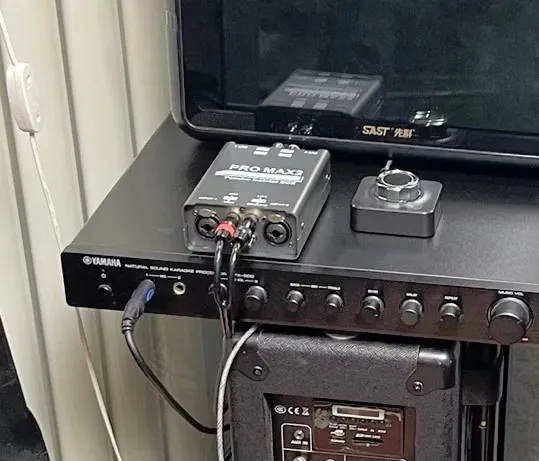
Instead of cluttering your studio desk with mismatched adapters and isolated dongles, a pro-grade matrix isolator like the FS-ELEC PRO MAX2 handles RCA to XLR conversions natively while completely isolating ground paths.
- Native RCA ↔ XLR ↔ 6.35mm Matrix: Directly plug your unbalanced RCA cables into the input and run balanced XLR cables out to your studio monitors—no adapter plugs required.
- 600 Ω / 10 kΩ Impedance Matching: Smoothly bridges the impedance gap between consumer high-impedance RCA sources and pro low-impedance XLR inputs with ultra-low distortion.
- 20Hz – 25kHz Flat Frequency Response (±0.2 dB): Unlike cheap isolators that roll off deep sub-bass when adapting RCA signals, high-fidelity custom transformers keep your low-end punch and high-frequency sparkle 100% intact.
- -15dB PAD Attenuation Switch: If your RCA source pushes a hot signal that overloads sensitive XLR audio interface inputs, flipping the -15dB PAD restores headroom instantly.
- Heavy-Duty Shielded Metal Chassis (470g): Shields against external RF interference from nearby WiFi routers or power bricks while staying firmly in place on your workstation.
Key Takeaways for RCA & XLR Integration
- Never rely on cheap, non-isolated RCA-to-XLR adapter plugs when connecting powered studio monitors or mixers.
- Use a passive audio ground isolator with built-in matrix routing to convert RCA to XLR safely.
- Engage the Ground Lift switch if AC hum or USB noise bleeds through your consumer DAC or DJ gear.
Frequently Ask Question:
A: Standard RCA-to-XLR cables bridge Pin 1 (Shield) and Pin 3 (Cold) together, destroying common-mode noise rejection and creating a direct ground loop between devices.
A: Yes, provided it features native matrix routing (like the PRO MAX2). It isolated the ground while allowing unbalance-to-balanced conversion without noise.