
In corporate boardrooms, conference centers, and hybrid Zoom/Teams meeting rooms, seamless audio clarity is essential for professional communication. Yet, one of the most frequent technical glitches during a high-stakes executive presentation or client video conference is a sudden, disruptive 60Hz hum, static buzz, or high-pitched digital whine coming through the ceiling speakers or teleconferencing feed.
This noise usually starts the instant a presenter plugs a laptop into the conference table HDMI/audio cable or when a room PC is linked to the central AV rack DSP.
As an audio and system integration engineer with 20 years of experience in commercial AV installations, I see this issue constantly in corporate environments. Corporate meeting rooms combine complex power distribution, long cable runs, HDMI video switchers, and teleconferencing codecs—creating multiple intersecting ground paths.
Here is why corporate AV systems suffer from ground loop noise and how to eliminate it permanently for pristine speech intelligibility and video call audio.
The Anatomy of Corporate AV & Conference Room Ground Loops
To understand why presentation audio buzzes, you have to trace the ground path created when tying table pop-up boxes, video displays, laptops, and central AV racks together.
┌──────────────────────────────────────────────────────────┐
│                      Conference Table                    │
│   [ Presenter Laptop ] ────── (Power Strip / Outlet A)   │
└───────────┬──────────────────────────────────────────────┘
            │
            │ (HDMI / 3.5mm Audio Cable)
            ▼
┌──────────────────────────────────────────────────────────┐
│                      Central AV Rack                     │
│   [ Video Matrix / DSP / Codec ] ── (Power Outlet B)     │
│   [ Multi-Channel Power Amp ]                           │
└───────────┬──────────────────────────────────────────────┘
            │
            ▼
┌──────────────────────────────────────────────────────────┐
│             Ceiling Speakers & Zoom Room Feed            │
│              (Loud 60Hz Hum & High-Pitch Whine)          │
└──────────────────────────────────────────────────────────┘
1. Table-to-Rack Power Potential Delta
In typical conference rooms, the electrical outlet in the floor box or conference table derives power from a different circuit than the equipment rack tucked away in an AV closet or credenza. Small voltage ground potential differences exist between the table power strip (Outlet A) and the rack PDU (Outlet B).
2. HDMI & USB Ground Shields
HDMI matrix switchers, USB extension docks, and video transmitters carry grounded copper shields. When a presenter connects a laptop to AC power and an HDMI/audio cable at the conference table, dirty high-frequency ground noise from laptop power supplies, display drivers, and USB buses flows along the cable shield back to the rack-mounted digital signal processor (DSP) or audio amplifier.
3. Mic vs. Line Input Level Mismatching
Corporate teleconferencing codecs (such as Zoom Rooms appliances or Teams meeting bars) and camera mic inputs are frequently calibrated for delicate mic-level signals. When an unbuffered, high-output line feed from a laptop or audio mixer is plugged into these inputs, the input stage clips—causing harsh harmonic distortion that amplifies ground noise further.
Step-by-Step Corporate AV Diagnostics
Follow this sequence to pinpoint the exact source of ground interference:
Step 1: The AC Power Disconnect Test
If the presentation laptop is producing a high-pitched whine or buzz over the conference room speakers, temporarily unplug the laptop’s power brick and run it on battery power.
- If the noise disappears instantly: The laptop power brick is creating an AC ground loop with the central AV rack.
Step 2: Test Audio Matrix Inputs Separately
Disconnect the laptop audio line (3.5mm or line output) while leaving the HDMI video cable connected to the table box.
- If the audio stream turns silent: The noise is traveling specifically across the analog audio signal ground line rather than the HDMI video shield.
Why Cheap Audio Filters Fail in Commercial Boardrooms
AV technicians sometimes attempt to solve conference room noise by placing cheap consumer inline noise filters behind table boxes. However, low-grade isolators introduce serious issues in corporate environments:
- Muddled Voice Intelligibility: Cheap transformers attenuate high frequencies (above 8kHz to 10kHz), making presenter vocals sound muffled and distant on remote Zoom or Teams calls.
- Low-Frequency Saturation & Distortion: Low-cost isolators saturate easily when handling high-level line signals, causing audible distortion during video playbacks or loud speech peaks.
- Flimsy Durability: Plastic dongles fail under frequent cable pulling and table box cable retractor stress.
The Permanent Solution: Galvanic Line Isolation & Attenuation
The most reliable, professional way to eliminate ground loop noise in conference rooms is to insert a passive 1:1 line isolator with custom broadcast-grade transformers between the presentation source (or table interface) and the main rack DSP/amplifier inputs.
[ Table Pop-Up / Presentation Feed ]
                 │ (RCA / 3.5mm / Line Out)
                 ▼
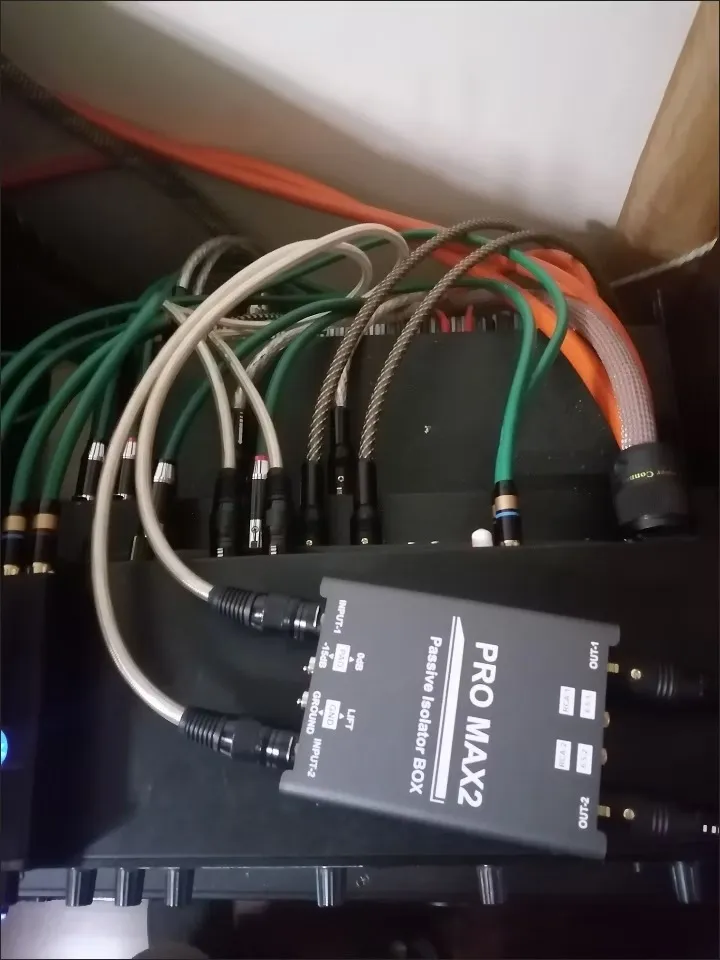
[ FS-ELEC PRO MAX2 Ground Isolator ] ──► (Physical Galvanic Break + -15dB Pad)
                 │ (XLR / 6.35mm / RCA Out)
                 ▼
[ Central AV Rack DSP / Amplifier ] =======> Crystal-Clear Boardroom Audio!
Why the FS-ELEC PRO MAX2 is Essential for Corporate AV Integrators
Designed for heavy-duty commercial installation and AV rack integration, the FS-ELEC PRO MAX2 provides a complete solution for conference rooms, auditoriums, and corporate presentation spaces:
- 1500V Galvanic Line Isolation: High-isolation custom transformers physically break copper ground paths between table power outlets and central AV rack PDUs, instantly terminating 60Hz AC hum and laptop power noise.
- 20Hz – 25kHz Flat Frequency Response (±0.2 dB): Preserves ultra-clear vocal presence for teleconferencing codecs and full dynamic range for corporate media presentations.
- Essential -15dB PAD Attenuation Switch: Prevents hot presentation audio or line-level mixer outputs from overdriving sensitive mic/line inputs on teleconferencing codecs (Zoom/Teams), video displays, or capture devices.
- Universal Matrix I/O (XLR, 6.35mm TRS/TS, RCA):
- Easily adapts unbalanced 3.5mm / RCA table connections to balanced XLR or 6.35mm TRS feeds running to central rack DSPs.
- Allows direct integration without extra signal adapters or signal loss.
- Industrial Shielded Steel Enclosure (470g): Heavy steel chassis blocks electromagnetic interference (EMI/RFI) from table cable retractors, wireless microphone receivers, and nearby network switches.
- Pro-Grade Ground Lift Switch: Offers instant, safe shield disconnection at the flip of a switch without altering AC power safety grounding.
Summary Checklist for Quiet Conference Rooms
- Never remove safety ground pins on AV rack power distribution units or amplifiers.
- Verify input gain staging on teleconferencing codecs to avoid line-to-mic input clipping distortion.
- Install a dedicated dual-channel passive isolator like the FS-ELEC PRO MAX2 on presentation audio lines to permanently eliminate corporate ground loop noise.
Frequently Ask Question:
A: Laptop power supplies plugged into conference table outlets create a ground potential differential with the main AV rack, sending noise down the audio/HDMI shield line.
A: Install a passive line isolation transformer (like the PRO MAX2) between the table audio source and the room DSP/codec input to break the ground loop safely.